Budget Spreadsheet
Zero Based Budget Spreadsheet
Zero Based Budget Spreadsheet
Couldn't load pickup availability
Take complete control of your money — every dollar, every month.
The Zero Based Budget Spreadsheet is a fully automated, all-in-one personal budgeting system built for Apple Numbers and Microsoft Excel. Designed around the zero-based budgeting method — where your income minus your expenses equals zero — this spreadsheet ensures every dollar you earn is assigned a purpose before it's spent.
What is zero-based budgeting?
Zero-based budgeting (ZBB) is a proven personal finance strategy where you allocate every dollar of income to a specific expense, savings goal, or debt payment. When done correctly, your total income minus your total budgeted expenses equals $0 — not because you're broke, but because every dollar has a job. This method eliminates wasteful spending, accelerates debt payoff, and builds savings faster than any other budgeting approach.
Product overview
The Zero Based Budget Spreadsheet replaces manual tracking and complicated formulas with a clean, automated system. Simply log your transactions once and watch your budget, monthly summaries, and annual analytics update automatically — no copy-pasting, no double entry.
Whether you're paying off debt, building an emergency fund, saving for a vacation, or just trying to stop overspending, this spreadsheet gives you a real-time, accurate picture of your finances every single month of the year.
Key features
Transaction log with auto-sync
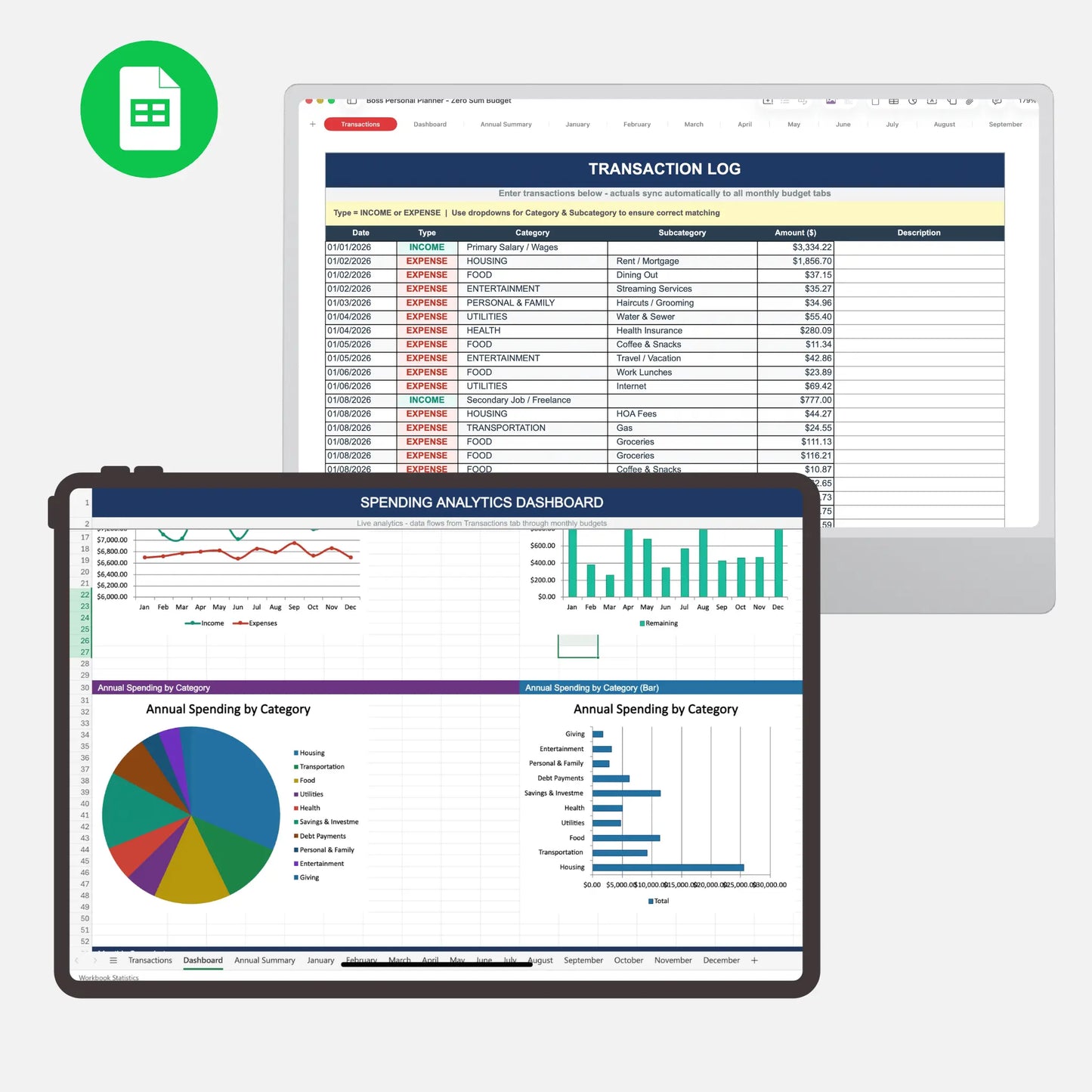
Enter each transaction once in the dedicated Transaction Log. Using date-based formulas, every transaction automatically flows into the correct month and category across your entire budget — no manual updates required. The log supports up to 5,000 transactions per year and sorts automatically by date.
12 monthly budget tabs
Each month has its own dedicated tab with a full budget breakdown. Enter your budgeted amounts once and track actuals automatically as transactions are logged. Every monthly tab includes a built-in Zero-Sum Dashboard showing budgeted vs. actual for total income, total expenses, and remaining balance at a glance.
Annual summary tab
See your full year of actual spending in one view. The Annual Summary tab aggregates actual amounts from all 12 months, organized by income source and spending category, with annual totals and monthly averages for every line item.
Spending analytics dashboard
A visual analytics dashboard brings your budget to life with four dynamic charts:
- Monthly income vs. expenses trend line
- Monthly remaining balance (your zero-sum check)
- Annual spending by category — pie chart
- Annual spending by category — horizontal bar chart
Five KPI cards display your annual income, annual expenses, net remaining, average monthly expenses, and savings rate — all calculated live from your transaction data.
10 spending categories, 57 line items
The spreadsheet covers every area of personal finance out of the box:
- Housing
- Transportation
- Food
- Utilities
- Health
- Savings & Investments
- Debt Payments
- Personal & Family
- Entertainment
- Giving
Every line item has a Budgeted column (you set this once) and an Actual column (populated automatically from your transactions).
Income tracking
Track up to seven income sources per month including salary, freelance income, investment dividends, rental income, side business revenue, and more. Income transactions are also logged in the Transaction Log and sync automatically to each monthly tab.
Smart transaction entry
The Transaction Log is built as a structured table with dropdown menus for Type (Income or Expense), Category, and Subcategory — making data entry fast and error-proof. Color-coded formatting highlights income entries in green and expense entries in red for instant visual clarity.
Who is this for?
This spreadsheet is built for anyone who wants to stop guessing where their money goes and start telling it where to go. It is especially well-suited for:
- People trying zero-based budgeting for the first time
- Households managing income from multiple sources
- Anyone paying off debt using a structured payoff plan
- Savers working toward a specific financial goal
- Freelancers and self-employed individuals with variable income
- Couples who want a shared, transparent view of household finances
Frequently asked questions
Do I need any special software or subscriptions? No. This is a standard .xlsx file that opens in Apple Numbers or Microsoft Excel. There are no subscriptions, no logins, and no cloud accounts required.
How does the auto-sync work? Each monthly tab uses SUMIFS formulas that look up transactions in the Transaction Log by date range, transaction type, category, and subcategory. When you log a transaction, the matching monthly budget cell updates automatically.
Can I add my own categories? Yes. The spreadsheet is fully editable. You can rename, add, or remove categories and line items to fit your personal spending habits.
What year does it cover? The budget year is set by a single cell on each monthly tab. Change it to any year and all formulas update automatically.
Is my data private? Completely. The spreadsheet runs entirely on your own device. No data is ever sent anywhere.
Can I use this for a household or family budget? Absolutely. The income and expense categories are designed to cover full household budgets, including childcare, family support, and multi-income households.
Why zero-based budgeting works
Unlike percentage-based budgets (like the 50/30/20 rule) that tell you roughly where your money should go, zero-based budgeting requires you to make a conscious decision about every dollar before the month begins. Research and personal finance experts consistently rank ZBB as one of the most effective methods for reducing debt, increasing savings, and building financial awareness — because it forces intentionality rather than assumption.
The Zero Based Budget Spreadsheet is the tool that makes this method practical, trackable, and sustainable for the long term.
Take every dollar from "I'm not sure where it went" to "I know exactly what it did."
Compatibility
Compatibility
Apple Numbers (macOS and iOS)
Microsoft Excel (Windows and Mac)
Google Sheets (with minor formula adjustments)
FAQ's
FAQ's
Do I need any special software or subscriptions? No. This is a standard .xlsx file that opens in Apple Numbers or Microsoft Excel. There are no subscriptions, no logins, and no cloud accounts required.
How does the auto-sync work? Each monthly tab uses SUMIFS formulas that look up transactions in the Transaction Log by date range, transaction type, category, and subcategory. When you log a transaction, the matching monthly budget cell updates automatically.
Can I add my own categories? Yes. The spreadsheet is fully editable. You can rename, add, or remove categories and line items to fit your personal spending habits.
What year does it cover? The budget year is set by a single cell on each monthly tab. Change it to any year and all formulas update automatically.
Is my data private? Completely. The spreadsheet runs entirely on your own device. No data is ever sent anywhere.
Can I use this for a household or family budget? Absolutely. The income and expense categories are designed to cover full household budgets, including childcare, family support, and multi-income households.
Refund Policy
Refund Policy
Due to the digital nature of this product, refunds will not be provided for any reason. Please double-check before you complete your purchase.
Please feel free to contact us with any questions or concerns prior to your purchase.